Picture an adult daughter helping her mom after dinner. The TV is on in the background, the house is quiet, and she pulls out her phone.
She types things like:
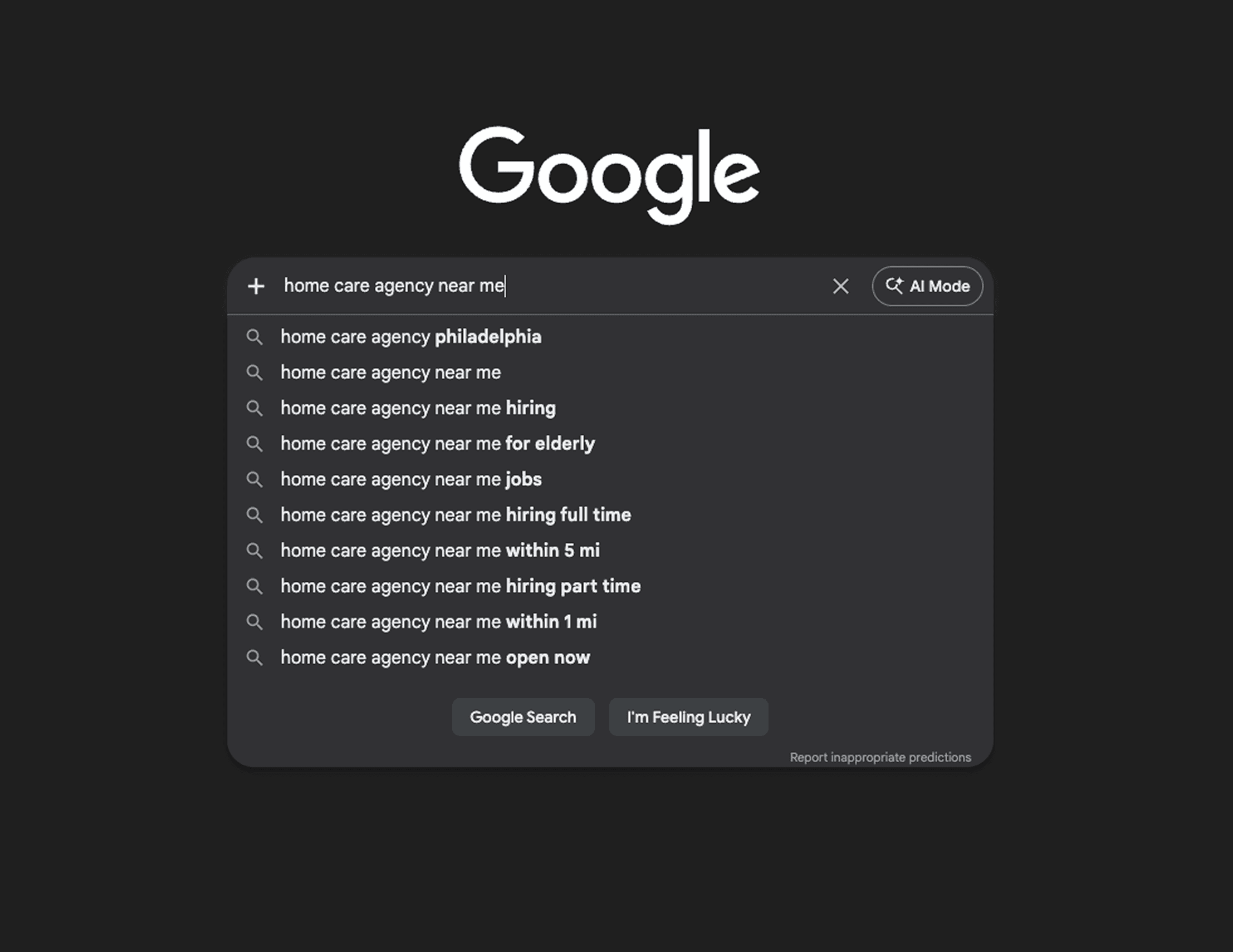
“home care near me”
“caregivers in [your city]”
“in-home care for seniors”
“home health aide jobs nearby”
Within a few seconds, she sees a handful of agencies, a map, some ads, and a list of websites. If your agency does not appear in those results, she may never find you. Even if your care is excellent, you lose opportunities simply because you are invisible in that moment.
The good news is you do not have to be a Search Engine Optimization (SEO) expert to change this. You do not need complex tools or technical language. You only need to:
Keep your agency information clear and consistent
Show Google that your agency is active and real
Stick to a few simple habits each week
This guide explains how local search works for home care and what you can do, step by step, to show up more often where families and caregivers are already looking. You can handle this yourself, or share it with your web vendor or marketer to make the updates for you.
What Local SEO Really Means for Home Care
Local SEO is about visibility when nearby people search for in-home care or caregiver jobs. It is not about reaching people across the country. It is about appearing at the exact moment someone nearby needs help for a loved one or is looking for work.
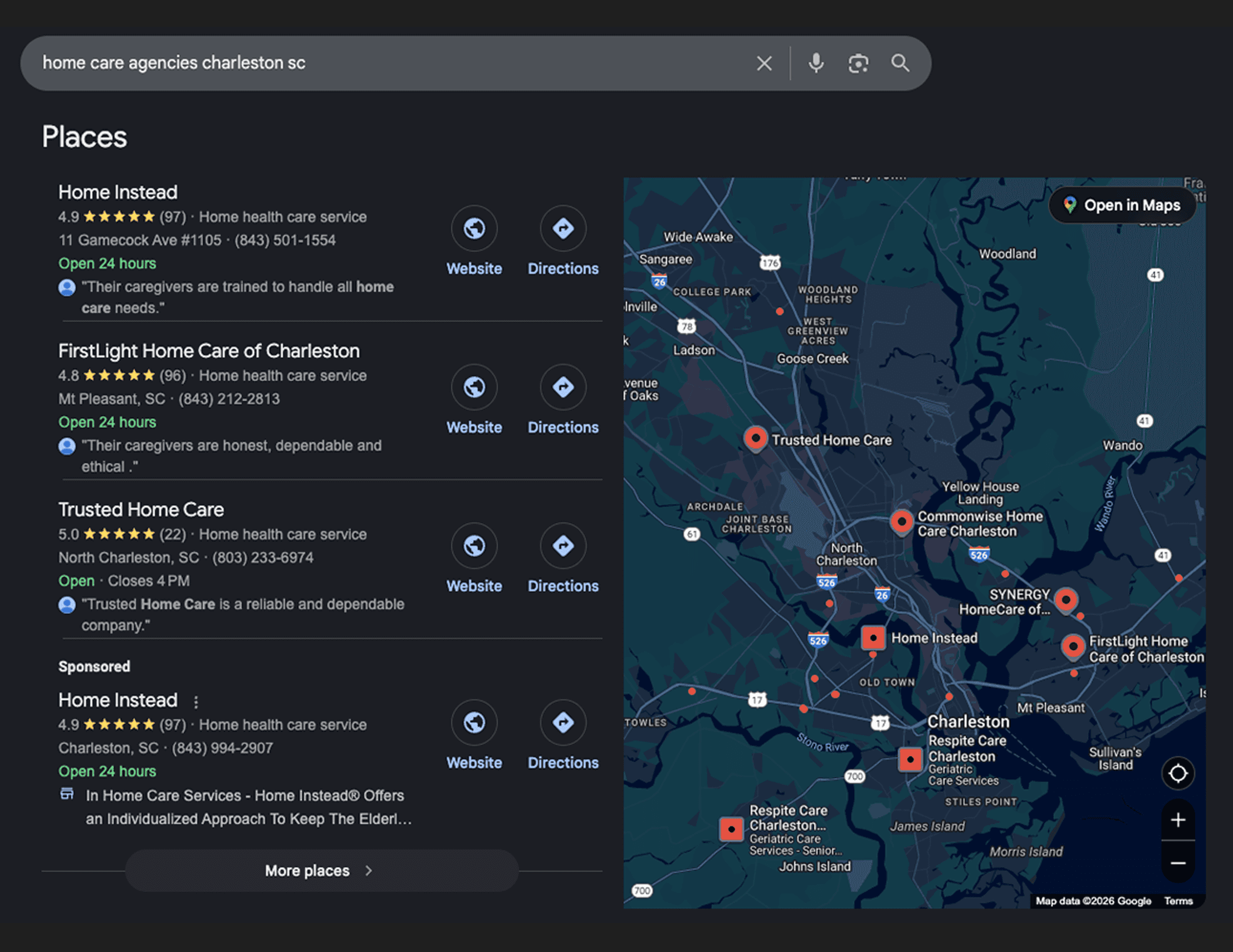
When someone searches “home care agency in Austin TX,” Google usually shows the page in a few key sections.
1. The Places Section (Map Pack)
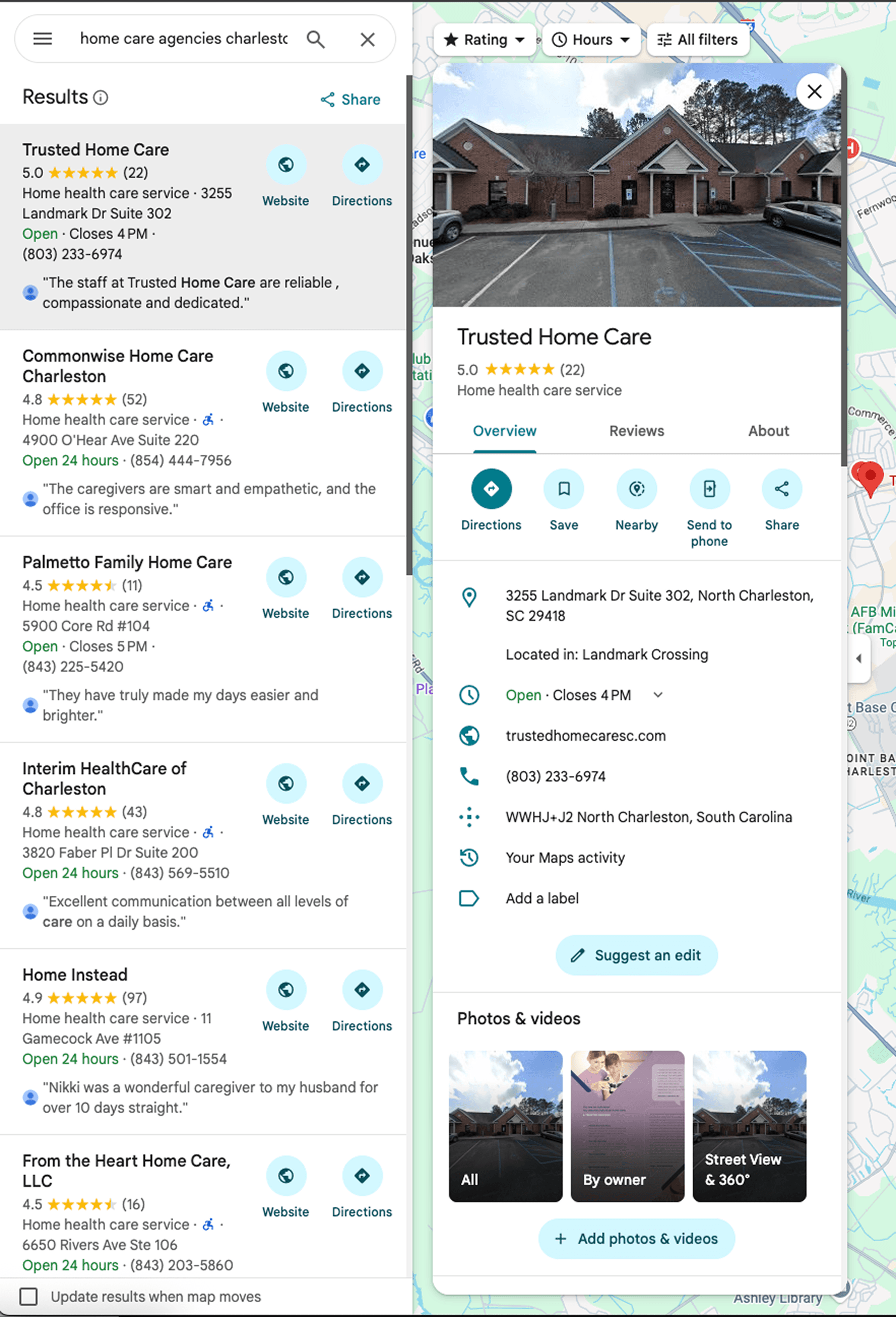
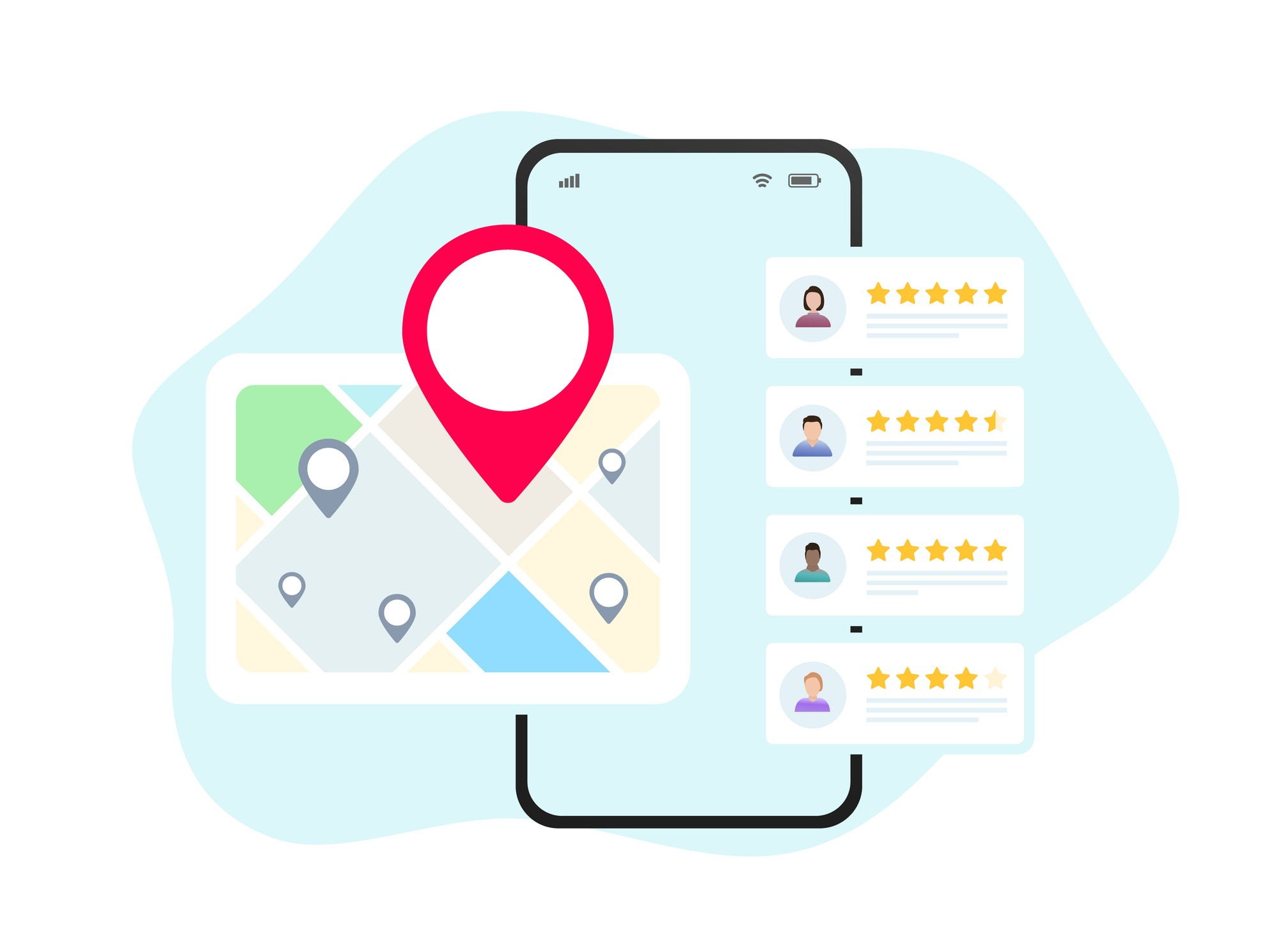
Near the top of the page, Google shows a group of local agencies with a map. This is often called the map pack.
Each entry usually includes:
The agency name
Star rating and number of reviews
Address and phone number
Hours
Buttons for Website and Directions
Families often start here because it feels like a short list of real options. If your Google Business Profile is complete, your reviews are recent, and your information is accurate, you are more likely to appear.
Caregivers searching for jobs also rely heavily on this section to decide who to contact first.

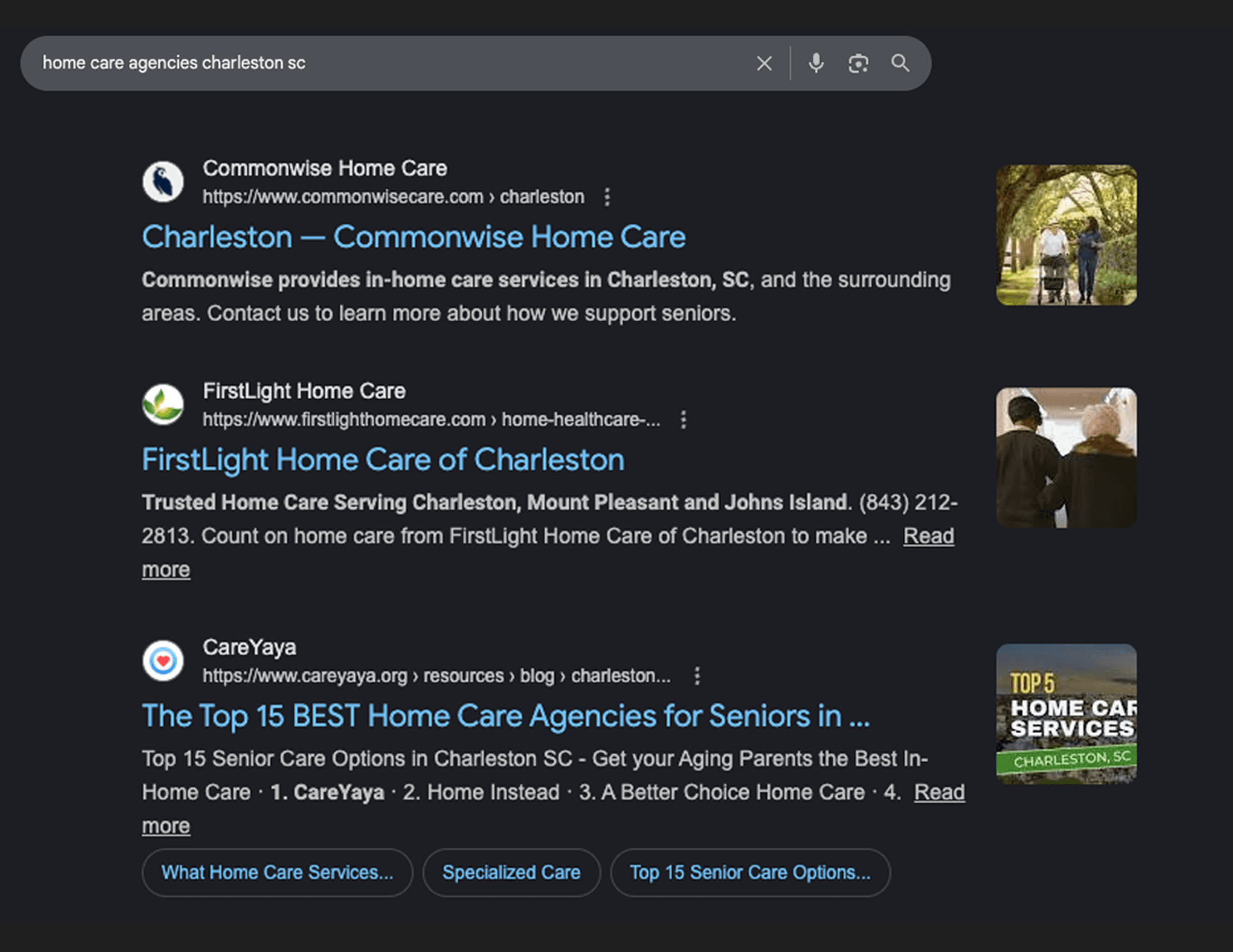
2. Organic Search Results
Below the map pack are the familiar website listings. These can include:
Your homepage
Service pages such as Personal Care, Companion Care, or 24-Hour Care
Blog posts and FAQs
Directory pages that mention your agency
Your page titles, headings, and local content all play a role in whether you appear in this section.

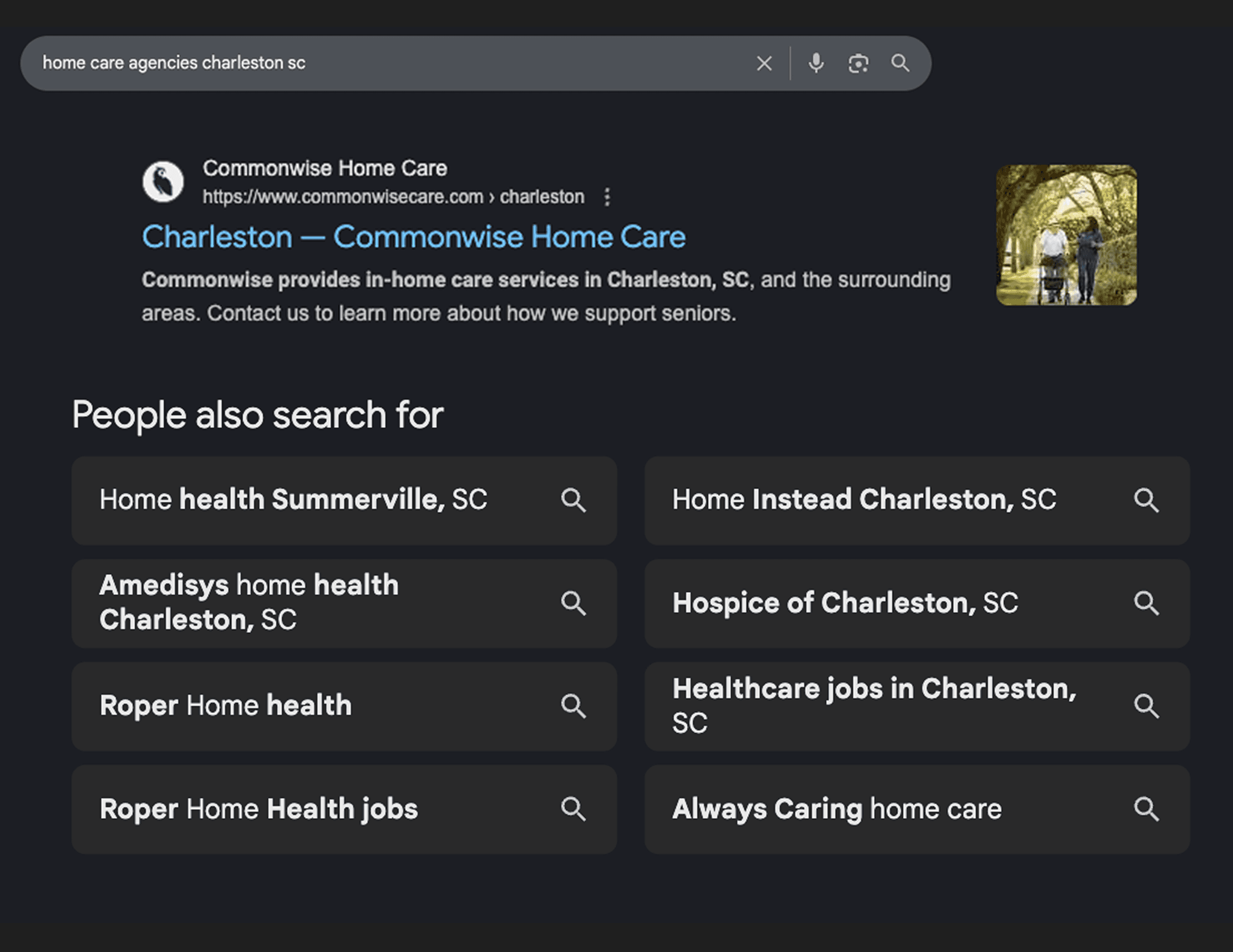
3. Find Related Products and Services
Further down, Google may show related searches such as:
“in-home senior care [city]”
“24 hour home care near me”
“private duty caregivers [city]”
These suggestions show how families narrow their search. They also show the exact phrases your website should include naturally in your content.

4. People Also Ask (PAA)
Google often adds a “People also ask” box with common questions, for example:
How much does home care cost per hour?
Does Medicare pay for home care?
What is the difference between home care and home health?
When your website answers these questions clearly, you are more likely to appear around this section. It also helps families feel informed before they ever call.

Why This Matters So Much For Senior Care
Families searching for home care are often stressed, short on time, and unsure who to trust. They want an agency that:
Serves their area
Responds quickly
Looks credible online
Job seekers behave the same way when searching for work. They look for agencies that are nearby, responsive, and clear about expectations.
When your agency appears in local search at these moments, you create more chances to:
Schedule in-home assessments or consultations
Receive calls from families ready to start care
Capture caregiver applications before competitors do
Fill shifts faster
If you do not appear, those conversations never even start.
How Google Decides Which Home Care Agencies Show Up
Behind the scenes, Google pays attention to three simple ideas.
Relevance
Google looks at your website and your Google Business Profile and asks, “Does this match what the person is searching for?” This includes your services, service areas, and wording.
Distance
Google favors agencies closer to the searcher or clearly serving their ZIP code or city.
Trust
Google looks for proof that your agency is legitimate and active. This includes reviews, photos, accurate hours, and consistent contact information across the web.
The rest of this guide walks through practical ways to strengthen each of these.
Step 1: Fix Your Google Business Profile (Your Digital Front Door)
Your Google Business Profile (GBP) is the small panel that appears on the right side of the search results and in Google Maps. For many families and job seekers, this is their first view of your agency before they ever reach your website.
If the profile is outdated, incomplete, or tied to an old email, you can lose calls and visits without realizing it.

Getting Access To Your GBP
Many home care agencies are unsure who set up their profile years ago. You need control before you can update anything.
If you know the login email
Visit business.google.com.
Sign in with the email you think owns the listing.
If you see your community dashboard, you are ready to edit.
If you are not sure which email owns the listing
Open Google Maps and search for your business name.
On your listing, look for “Claim this business” or “Own this business”.
Click the link and Google will show a partial hint of the email that currently owns the profile.
If you recognize it, sign in with that address.
If you do not, choose the “Request access” option and follow the prompts. Google will contact the owner and ask them to grant you control. If they do not respond within the set time, Google will offer other ways to verify your role.
If the listing is unclaimed
Sometimes Google creates a basic listing by pulling information from around the web.
Click “Claim this business”.
Follow the verification steps. This might involve a phone call, text message, postcard, or a short video.
Once finished, you can edit all the details.
If the email belongs to someone who has left
This is common when former administrators, marketers, or agencies handled local listings.
Start by requesting access through Google’s form.
After review, they can transfer ownership to your current team.
Once you have control, record which email owns the profile and store that information in a shared document so it does not disappear when people move on.
Important:
Write down which email now owns the profile and store it in a shared document that your leadership team can access.
What To Include In Your GBP
Once you are in, your goal is to make the profile accurate, thorough, and welcoming.
Business description
Write a short paragraph that covers:
Who you serve and what kinds of in-home care your agency provides
Your city and general service area
Families and Google both use this description to understand whether your agency is a fit. You can edit it under “Edit profile” and then “About”.
Name, address, and phone number
Your agency name, physical address, and main phone number should match your website and major directories exactly. Google compares these details across the internet. If they differ, your listing may seem less trustworthy. For home care agencies, service area accuracy matters more than a physical office address. If you serve multiple cities, list them clearly.
Take a moment to check your GBP, your website, Yelp, Bing Places, and other key sites. Fix any differences in spelling, abbreviations, or phone formatting.
Categories
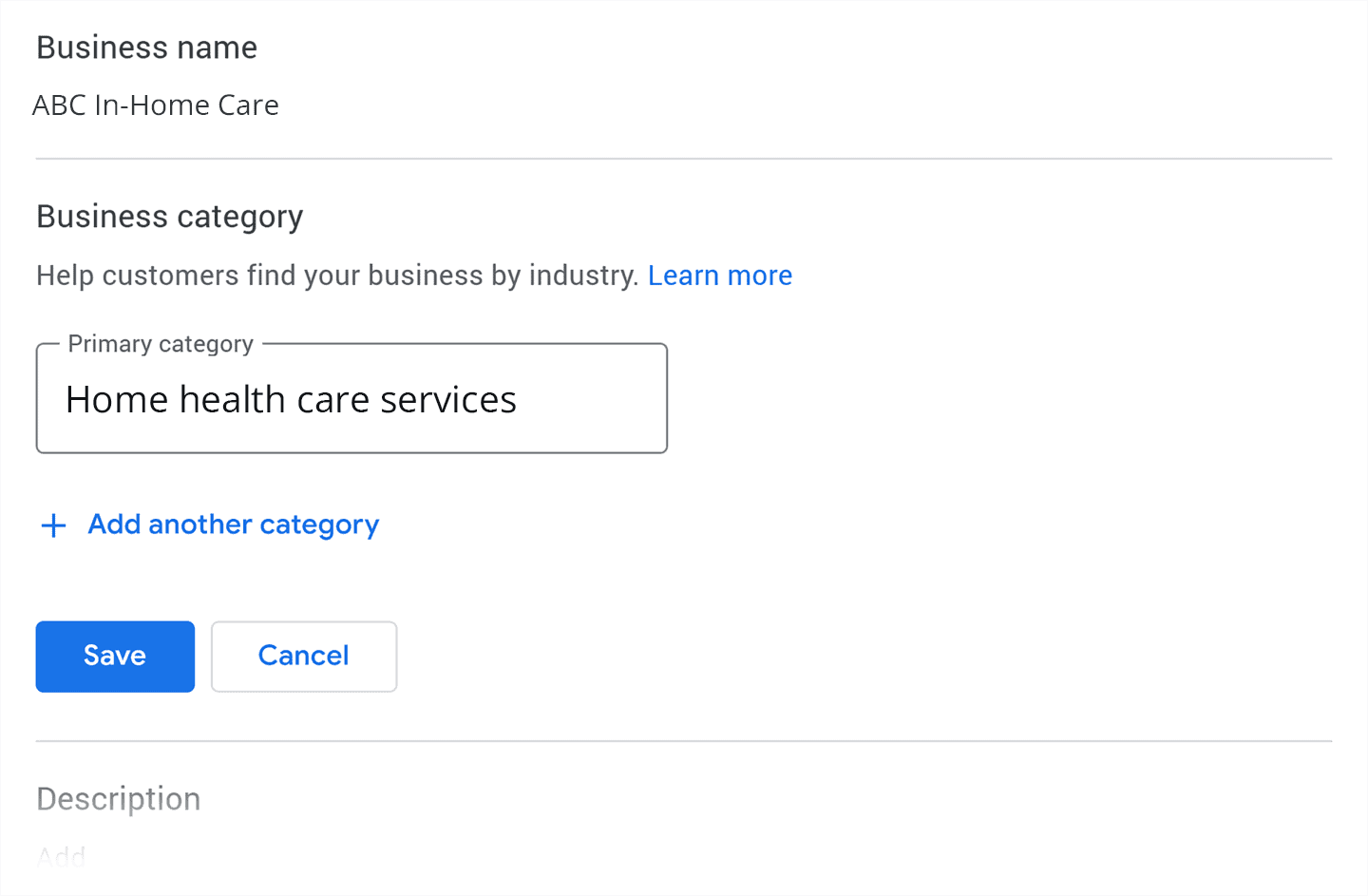
Choose one main category that best fits your community, such as “Home Care Agency” or “Home health care service”. Then add secondary categories that truly match your services.
You can add secondary categories if they apply, such as:
Home Health Care Service
Elder Care Service
Personal Care Service

Services and attributes
Under the Services section, list offerings in plain language, such as:
Personal care (bathing, dressing, grooming)
Companion care
24-hour or live-in care
Post-hospital support
Respite care
Alzheimer’s and dementia care
These services help Google match your agency to real searches.
Photos

Photos signal activity and trust.
Add:
Your office exterior or signage, if applicable
Your care team (with permission)
Non-stock lifestyle photos that reflect real care
Update photos every few months if possible. Fresh activity helps visibility.
Step 2: Make Your Website Easy for Google to Understand
Your website and your GBP work together. When both tell a consistent story about your services and location, Google gains confidence and is more likely to show you.
Titles, headers, and meta descriptions
Every page has a title and usually a main heading at the top. Many also have a short description that appears under the title in search results.
You can make these work for you by:
Including your city and service name in a natural way, such as “In-Home Senior Care in [City] - [Company Name]’
Using your meta description to briefly explain who you serve and what you provide, for example ““We provide in-home care throughout [City], [City], and surrounding areas.”
If this feels technical, you do not need to make the changes yourself. Share this section with your website partner and ask them to review your main pages.
Location details in your footer

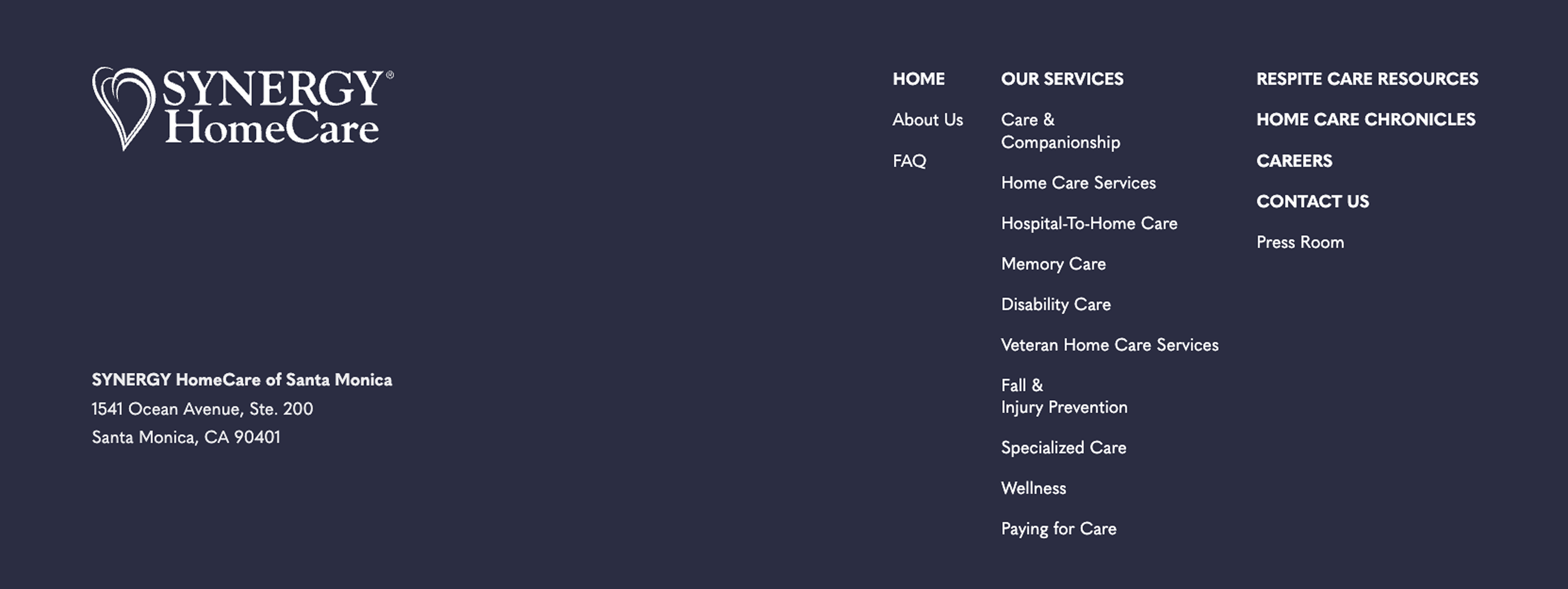
The footer is the section at the bottom of your site that appears on every page. It is a great place to repeat your:
Agency name
Full address
Main phone number
Simple phrase such as “Serving families in [City/Region]”
This gives Google and visitors a consistent reminder of where you are.
A separate page for each service
When all your services are piled onto one page, Google may struggle to match you with specific searches. Separate pages make this much easier.
Create pages such as:
“In-Home Senior Care in [City]”
“24-Hour Home Care Services in [City]”
“Companion Care for Seniors in [City]”
Each page should clearly say:
Who the service is for
What help is provided
Where you offer it
How to get started
Avoid vague language. Write the way families speak.
Internal links
Links from one page on your site to another help both Google and people move around.
Whenever a blog post or FAQ mentions a service like “Companion Care”, link that phrase back to your Companion Care page. This quietly tells search engines which pages are important.
Structured data (LocalBusiness schema)
Structured data is a small block of code added to your site that labels important information such as your community name, address, phone number, hours, and services. The most common format is called Schema markup, which is the format Google recommends.
Think of it this way. Your website already shows this information to families, but Schema markup makes it easier for search engines to read it too. This helps them match your site with nearby searches more accurately.
Structured data is helpful for a few reasons:
Google sometimes features websites that use it in richer listings that show more than just a blue link.
It helps search engines trust that your hours, phone number, and address are correct.
It can support newer search features that pull quick facts from your website, including your hours and services.
If you want to add structured data yourself, the easiest place to start is with LocalBusiness schema, which is designed specifically for local organizations. At a minimum, your markup should include:
Agency name
Address
Phone number
Website URL
Hours of operation
Logo and a few images
Geo coordinates such as latitude and longitude
You can place this markup on key pages such as your homepage, your contact page, or each location page if you operate more than one community.
Some operators prefer to place this task with their web administrator or marketing partner. If you go that route, you can send them a simple request:
“Please add LocalBusiness schema to our site with our correct name, address, phone, hours, and geo coordinates. After adding it, confirm it passes Google’s structured data test.”
This keeps the process simple while giving search engines a clearer view of your community’s information.
Step 3: Build Local Authority With Backlinks

Backlinks are links from other websites to your own. In the eyes of Google, each good link is like a small vote that says, “This agency is real and known in our area.”
You can earn helpful backlinks by:
Confirming your membership with the local chamber of commerce and making sure your listing includes a link to your website
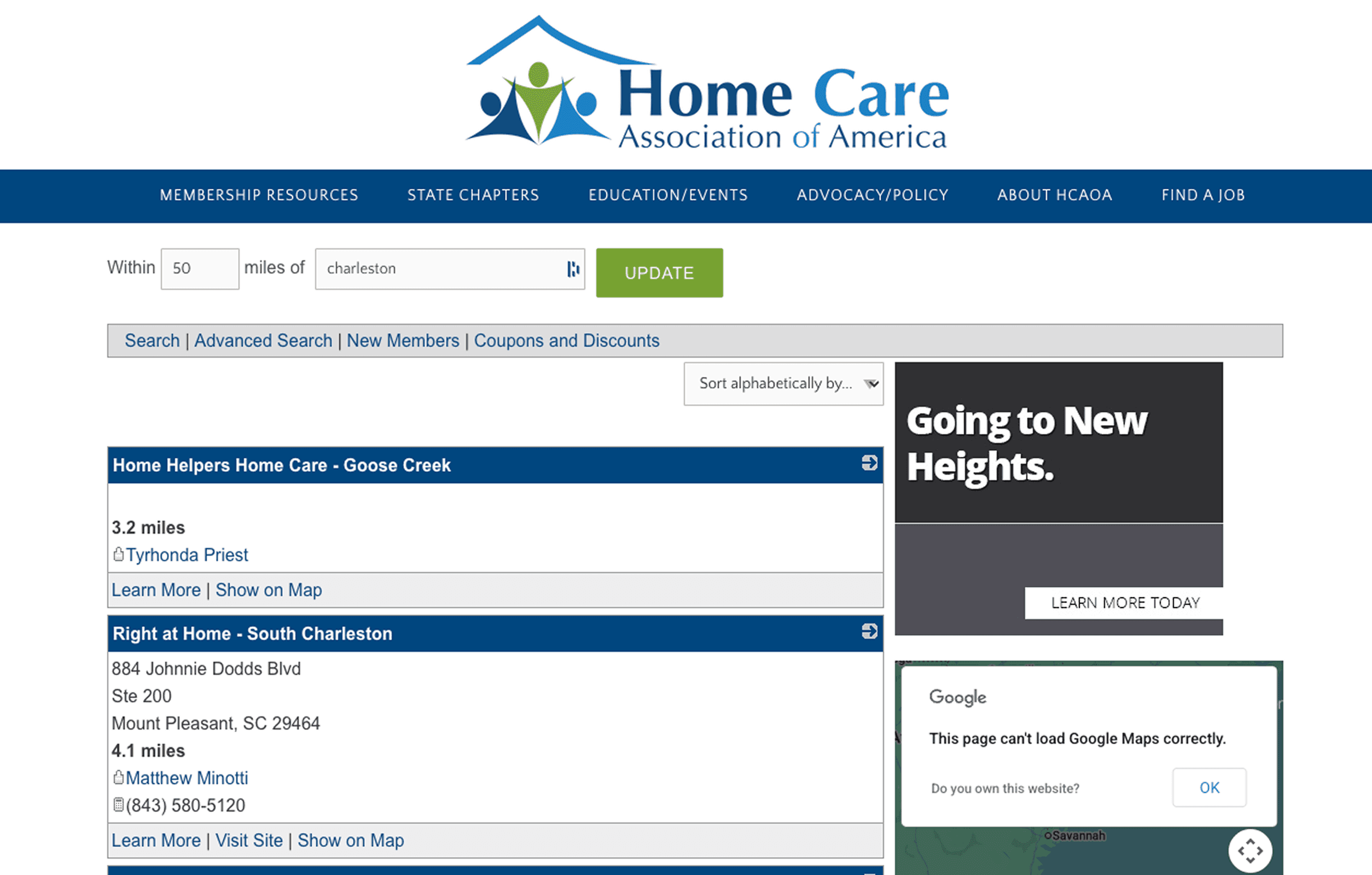
Filling out profiles on senior care and home care associations or networks that already mention your agency
Asking hospitals or referral partners to list you on their preferred provider pages
Requesting a link when you sponsor or participate in local events, support groups, or charity work
Making sure faith communities and nonprofits that you work with mention your agency and link to your site on any partner pages they maintain
Focus on links from organizations you already know and trust. You do not need hundreds of random listings. A smaller number of meaningful local links sends a much stronger message.
Step 4: Get More Real Reviews
Reviews are online word of mouth. They are one of the clearest signals Google has for trust, and they play a huge role in a family’s final choice.
You can steadily grow your reviews by building simple habits into everyday moments.
After a positive consultation, thank the family and mention that a short Google review helps other families find you.
After a successful care milestone, consider sending a follow up email that includes your review link and a brief request.
When a family compliments your staff, ask if they would be open to sharing that feedback on Google so others can see it.
In your GBP dashboard you can click “Ask for reviews” and copy a short link or QR code. Add that link to emails, texts, and printed cards so people can get to the review screen in one step.
Respond to every review that comes in. Thank people for the kind words, and for critical reviews, acknowledge their experience and invite them to continue the conversation offline. Remember that future families read your reply as closely as the original review.
Step 5: Keep All Online Listings Consistent
Google does not rely on your website alone. It cross checks your information with directories like:
Yelp
Bing Places
Apple Maps
Senior care and home care directories
Take time to review each listing and confirm that your:
Agency name is written the same way
Address uses the same abbreviations
Phone number matches your main line
Also make sure your name, address, and phone are written as normal text on your website, not only inside a logo image. Voice assistants and search engines read text more easily.
Consistent information across all of these sources tells Google that your home care agency is real and stable, which in turn helps you appear more often.
Step 6: Add Simple Local Content
You do not need to be a professional writer to publish helpful content. Short pages that answer real questions can make a big difference.
Think about the questions families ask your team most often, such as:
How much does home care cost per hour in [State]?
What is the difference between home care and home health?
Is home care covered by insurance or private pay?
How quickly can care start?
Clear answers build trust and improve search visibility at the same time.
Turn each question into a brief article or FAQ on your site. When it makes sense, mention local details, for example:
“near [city or state]”
“serving families in [neighborhood names]”
Link these answers back to your main service pages. This helps Google see you as a helpful resource and gives families more confidence before they pick up the phone.
Step 7: Do Not Forget Job Seekers
Local search is not only about families. Caregivers, CNAs, nurses, and other staff use Google the same way.
Create a clear “Careers” or “Join Our Team” page that:
Lists current roles with job titles and locations
Describes shift types and main responsibilities
Notes basic requirements
Mentions your city and service area in headings and copy
Job seekers often search phrases like “CNA jobs in [city]” or “caregiver jobs near me”. If your job pages use similar language, they are more likely to appear for those searches.
Keep this page current. Remove filled positions and add new roles promptly so you are not inviting candidates to apply for jobs that no longer exist.
Step 8: Monitor Your Progress
You do not need to watch every metric. A few simple checks can show whether your efforts are working.
Each month, you can:
Open Google Business Profile Insights to see how many people saw your listing, clicked to your website, called your agency, or requested follow up.
Look at Google Search Console for the search terms that bring people to your site and which pages get the most visitors
Perform a private search for phrases such as “[service] in [city]” and “[agency name] [city]” to see where you appear and how your listing looks
Every three months, set aside a short session to:
Confirm that your GBP details are still accurate
Double check your name, address, and phone number across Google, Yelp, Bing, and Apple Maps
Load your main service pages on a phone to make sure they still open quickly and are easy to read. Or use PageSpeed Insights (https://pagespeed.web.dev/) to see if your key pages load quickly on mobile.
Click through your site to make sure important links are not broken
The goal is not perfection. It is simply to catch anything that might confuse families or search engines before it becomes a bigger issue.
Step 9: Rinse and Repeat with a Simple Weekly Checklist
A realistic weekly routine might look like this:
Reply to any new reviews
Add a fresh photo to your GBP when you have one
Confirm that your hours and phone number are still correct
Answer any questions left on your GBP
Add a small FAQ or note down a new content idea based on questions families asked that week
These small actions, repeated consistently, build a stronger online presence over time.
Turn New Traffic Into Real Conversations
If you follow the steps in this guide, something important will start to happen. More families and job seekers will find you.
They will search for home care in your area, see your agency in the map pack, read your reviews, and click through to your website. They might be sitting on the couch after work, in a hospital room with a loved one, or scrolling through their phone on a break between shifts.
The question is what happens in that moment.
Do they see a basic contact form and hope someone gets back to them tomorrow?
Do they have to leave a voicemail and wait for a call?
Or do they get answers and a clear next step while their interest is still fresh?
All the work you just did brings more people to your digital front door. The next step is making sure someone is there to greet them.
That is where Alita comes in.
Alita acts like a member of your team who never sleeps. When a family lands on your website, Alita can introduce your home care agency, answer common questions, and help them schedule a care consultation on the spot. When a caregiver or nurse visits your site to look for work, Alita can walk them through the basics and book an interview directly onto your calendar.
No matter what time they arrive, visitors feel acknowledged, informed, and guided to the next step.

If you want to see how this could work for your own agency, you can start your free 30 day trial of Alita here: https://hub.alitahealth.ai/register
What is the most important factor for ranking a home care agency on Google?
A complete and accurate Google Business Profile is the single biggest driver of local visibility for home care agencies.
Do home care providers need advanced SEO tools to rank locally?
No. Clear service pages, consistent contact information, reviews, and basic local content are often enough to improve rankings.
Why is local SEO critical for home care providers?
Families and caregivers search with urgency and proximity in mind, and agencies that appear first are far more likely to receive calls, applications, and consultations.
Summary
This guide explains how home care providers can improve their Google rankings without becoming SEO experts. It walks through how local search works, what families and job seekers see on results pages, and how Google evaluates relevance, distance, and trust. The article outlines practical steps such as optimizing Google Business Profiles, improving website structure, earning local backlinks, collecting reviews, maintaining consistent listings, and publishing simple local content. It concludes by emphasizing that increased visibility only matters if agencies respond quickly, positioning Alita as the always-on solution that turns new traffic into real conversations, consultations, and hires.
The Essential Guide to Ranking on Google: For Home Care Providers
Home care providers can rank higher on Google by focusing on local search fundamentals: optimizing their Google Business Profile, keeping agency information consistent across the web, creating clear service and location pages, earning local backlinks, and collecting real reviews. These steps help agencies appear when families and caregivers search for care or jobs in their area.
Picture an adult daughter helping her mom after dinner. The TV is on in the background, the house is quiet, and she pulls out her phone.
She types things like:
“home care near me”
“caregivers in [your city]”
“in-home care for seniors”
“home health aide jobs nearby”
Within a few seconds, she sees a handful of agencies, a map, some ads, and a list of websites. If your agency does not appear in those results, she may never find you. Even if your care is excellent, you lose opportunities simply because you are invisible in that moment.
The good news is you do not have to be a Search Engine Optimization (SEO) expert to change this. You do not need complex tools or technical language. You only need to:
Keep your agency information clear and consistent
Show Google that your agency is active and real
Stick to a few simple habits each week
This guide explains how local search works for home care and what you can do, step by step, to show up more often where families and caregivers are already looking. You can handle this yourself, or share it with your web vendor or marketer to make the updates for you.
What Local SEO Really Means for Home Care
Local SEO is about visibility when nearby people search for in-home care or caregiver jobs. It is not about reaching people across the country. It is about appearing at the exact moment someone nearby needs help for a loved one or is looking for work.
When someone searches “home care agency in Austin TX,” Google usually shows the page in a few key sections.
1. The Places Section (Map Pack)
Near the top of the page, Google shows a group of local agencies with a map. This is often called the map pack.
Each entry usually includes:
The agency name
Star rating and number of reviews
Address and phone number
Hours
Buttons for Website and Directions
Families often start here because it feels like a short list of real options. If your Google Business Profile is complete, your reviews are recent, and your information is accurate, you are more likely to appear.
Caregivers searching for jobs also rely heavily on this section to decide who to contact first.
2. Organic Search Results
Below the map pack are the familiar website listings. These can include:
Your homepage
Service pages such as Personal Care, Companion Care, or 24-Hour Care
Blog posts and FAQs
Directory pages that mention your agency
Your page titles, headings, and local content all play a role in whether you appear in this section.
3. Find Related Products and Services
Further down, Google may show related searches such as:
“in-home senior care [city]”
“24 hour home care near me”
“private duty caregivers [city]”
These suggestions show how families narrow their search. They also show the exact phrases your website should include naturally in your content.
4. People Also Ask (PAA)
Google often adds a “People also ask” box with common questions, for example:
How much does home care cost per hour?
Does Medicare pay for home care?
What is the difference between home care and home health?
When your website answers these questions clearly, you are more likely to appear around this section. It also helps families feel informed before they ever call.
Why This Matters So Much For Senior Care
Families searching for home care are often stressed, short on time, and unsure who to trust. They want an agency that:
Serves their area
Responds quickly
Looks credible online
Job seekers behave the same way when searching for work. They look for agencies that are nearby, responsive, and clear about expectations.
When your agency appears in local search at these moments, you create more chances to:
Schedule in-home assessments or consultations
Receive calls from families ready to start care
Capture caregiver applications before competitors do
Fill shifts faster
If you do not appear, those conversations never even start.
How Google Decides Which Home Care Agencies Show Up
Behind the scenes, Google pays attention to three simple ideas.
Relevance
Google looks at your website and your Google Business Profile and asks, “Does this match what the person is searching for?” This includes your services, service areas, and wording.
Distance
Google favors agencies closer to the searcher or clearly serving their ZIP code or city.
Trust
Google looks for proof that your agency is legitimate and active. This includes reviews, photos, accurate hours, and consistent contact information across the web.
The rest of this guide walks through practical ways to strengthen each of these.
Step 1: Fix Your Google Business Profile (Your Digital Front Door)
Your Google Business Profile (GBP) is the small panel that appears on the right side of the search results and in Google Maps. For many families and job seekers, this is their first view of your agency before they ever reach your website.
If the profile is outdated, incomplete, or tied to an old email, you can lose calls and visits without realizing it.
Getting Access To Your GBP
Many home care agencies are unsure who set up their profile years ago. You need control before you can update anything.
If you know the login email
Visit business.google.com.
Sign in with the email you think owns the listing.
If you see your community dashboard, you are ready to edit.
If you are not sure which email owns the listing
Open Google Maps and search for your business name.
On your listing, look for “Claim this business” or “Own this business”.
Click the link and Google will show a partial hint of the email that currently owns the profile.
If you recognize it, sign in with that address.
If you do not, choose the “Request access” option and follow the prompts. Google will contact the owner and ask them to grant you control. If they do not respond within the set time, Google will offer other ways to verify your role.
If the listing is unclaimed
Sometimes Google creates a basic listing by pulling information from around the web.
Click “Claim this business”.
Follow the verification steps. This might involve a phone call, text message, postcard, or a short video.
Once finished, you can edit all the details.
If the email belongs to someone who has left
This is common when former administrators, marketers, or agencies handled local listings.
Start by requesting access through Google’s form.
After review, they can transfer ownership to your current team.
Once you have control, record which email owns the profile and store that information in a shared document so it does not disappear when people move on.
Important:
Write down which email now owns the profile and store it in a shared document that your leadership team can access.
What To Include In Your GBP
Once you are in, your goal is to make the profile accurate, thorough, and welcoming.
Business description
Write a short paragraph that covers:
Who you serve and what kinds of in-home care your agency provides
Your city and general service area
Families and Google both use this description to understand whether your agency is a fit. You can edit it under “Edit profile” and then “About”.
Name, address, and phone number
Your agency name, physical address, and main phone number should match your website and major directories exactly. Google compares these details across the internet. If they differ, your listing may seem less trustworthy. For home care agencies, service area accuracy matters more than a physical office address. If you serve multiple cities, list them clearly.
Take a moment to check your GBP, your website, Yelp, Bing Places, and other key sites. Fix any differences in spelling, abbreviations, or phone formatting.
Categories
Choose one main category that best fits your community, such as “Home Care Agency” or “Home health care service”. Then add secondary categories that truly match your services.
You can add secondary categories if they apply, such as:
Home Health Care Service
Elder Care Service
Personal Care Service
Services and attributes
Under the Services section, list offerings in plain language, such as:
Personal care (bathing, dressing, grooming)
Companion care
24-hour or live-in care
Post-hospital support
Respite care
Alzheimer’s and dementia care
These services help Google match your agency to real searches.
Photos
Photos signal activity and trust.
Add:
Your office exterior or signage, if applicable
Your care team (with permission)
Non-stock lifestyle photos that reflect real care
Update photos every few months if possible. Fresh activity helps visibility.
Step 2: Make Your Website Easy for Google to Understand
Your website and your GBP work together. When both tell a consistent story about your services and location, Google gains confidence and is more likely to show you.
Titles, headers, and meta descriptions
Every page has a title and usually a main heading at the top. Many also have a short description that appears under the title in search results.
You can make these work for you by:
Including your city and service name in a natural way, such as “In-Home Senior Care in [City] - [Company Name]’
Using your meta description to briefly explain who you serve and what you provide, for example ““We provide in-home care throughout [City], [City], and surrounding areas.”
If this feels technical, you do not need to make the changes yourself. Share this section with your website partner and ask them to review your main pages.
Location details in your footer
The footer is the section at the bottom of your site that appears on every page. It is a great place to repeat your:
Agency name
Full address
Main phone number
Simple phrase such as “Serving families in [City/Region]”
This gives Google and visitors a consistent reminder of where you are.
A separate page for each service
When all your services are piled onto one page, Google may struggle to match you with specific searches. Separate pages make this much easier.
Create pages such as:
“In-Home Senior Care in [City]”
“24-Hour Home Care Services in [City]”
“Companion Care for Seniors in [City]”
Each page should clearly say:
Who the service is for
What help is provided
Where you offer it
How to get started
Avoid vague language. Write the way families speak.
Internal links
Links from one page on your site to another help both Google and people move around.
Whenever a blog post or FAQ mentions a service like “Companion Care”, link that phrase back to your Companion Care page. This quietly tells search engines which pages are important.
Structured data (LocalBusiness schema)
Structured data is a small block of code added to your site that labels important information such as your community name, address, phone number, hours, and services. The most common format is called Schema markup, which is the format Google recommends.
Think of it this way. Your website already shows this information to families, but Schema markup makes it easier for search engines to read it too. This helps them match your site with nearby searches more accurately.
Structured data is helpful for a few reasons:
Google sometimes features websites that use it in richer listings that show more than just a blue link.
It helps search engines trust that your hours, phone number, and address are correct.
It can support newer search features that pull quick facts from your website, including your hours and services.
If you want to add structured data yourself, the easiest place to start is with LocalBusiness schema, which is designed specifically for local organizations. At a minimum, your markup should include:
Agency name
Address
Phone number
Website URL
Hours of operation
Logo and a few images
Geo coordinates such as latitude and longitude
You can place this markup on key pages such as your homepage, your contact page, or each location page if you operate more than one community.
Some operators prefer to place this task with their web administrator or marketing partner. If you go that route, you can send them a simple request:
“Please add LocalBusiness schema to our site with our correct name, address, phone, hours, and geo coordinates. After adding it, confirm it passes Google’s structured data test.”
This keeps the process simple while giving search engines a clearer view of your community’s information.
Step 3: Build Local Authority With Backlinks
Backlinks are links from other websites to your own. In the eyes of Google, each good link is like a small vote that says, “This agency is real and known in our area.”
You can earn helpful backlinks by:
Confirming your membership with the local chamber of commerce and making sure your listing includes a link to your website
Filling out profiles on senior care and home care associations or networks that already mention your agency
Asking hospitals or referral partners to list you on their preferred provider pages
Requesting a link when you sponsor or participate in local events, support groups, or charity work
Making sure faith communities and nonprofits that you work with mention your agency and link to your site on any partner pages they maintain
Focus on links from organizations you already know and trust. You do not need hundreds of random listings. A smaller number of meaningful local links sends a much stronger message.
Step 4: Get More Real Reviews
Reviews are online word of mouth. They are one of the clearest signals Google has for trust, and they play a huge role in a family’s final choice.
You can steadily grow your reviews by building simple habits into everyday moments.
After a positive consultation, thank the family and mention that a short Google review helps other families find you.
After a successful care milestone, consider sending a follow up email that includes your review link and a brief request.
When a family compliments your staff, ask if they would be open to sharing that feedback on Google so others can see it.
In your GBP dashboard you can click “Ask for reviews” and copy a short link or QR code. Add that link to emails, texts, and printed cards so people can get to the review screen in one step.
Respond to every review that comes in. Thank people for the kind words, and for critical reviews, acknowledge their experience and invite them to continue the conversation offline. Remember that future families read your reply as closely as the original review.
Step 5: Keep All Online Listings Consistent
Google does not rely on your website alone. It cross checks your information with directories like:
Yelp
Bing Places
Apple Maps
Senior care and home care directories
Take time to review each listing and confirm that your:
Agency name is written the same way
Address uses the same abbreviations
Phone number matches your main line
Also make sure your name, address, and phone are written as normal text on your website, not only inside a logo image. Voice assistants and search engines read text more easily.
Consistent information across all of these sources tells Google that your home care agency is real and stable, which in turn helps you appear more often.
Step 6: Add Simple Local Content
You do not need to be a professional writer to publish helpful content. Short pages that answer real questions can make a big difference.
Think about the questions families ask your team most often, such as:
How much does home care cost per hour in [State]?
What is the difference between home care and home health?
Is home care covered by insurance or private pay?
How quickly can care start?
Clear answers build trust and improve search visibility at the same time.
Turn each question into a brief article or FAQ on your site. When it makes sense, mention local details, for example:
“near [city or state]”
“serving families in [neighborhood names]”
Link these answers back to your main service pages. This helps Google see you as a helpful resource and gives families more confidence before they pick up the phone.
Step 7: Do Not Forget Job Seekers
Local search is not only about families. Caregivers, CNAs, nurses, and other staff use Google the same way.
Create a clear “Careers” or “Join Our Team” page that:
Lists current roles with job titles and locations
Describes shift types and main responsibilities
Notes basic requirements
Mentions your city and service area in headings and copy
Job seekers often search phrases like “CNA jobs in [city]” or “caregiver jobs near me”. If your job pages use similar language, they are more likely to appear for those searches.
Keep this page current. Remove filled positions and add new roles promptly so you are not inviting candidates to apply for jobs that no longer exist.
Step 8: Monitor Your Progress
You do not need to watch every metric. A few simple checks can show whether your efforts are working.
Each month, you can:
Open Google Business Profile Insights to see how many people saw your listing, clicked to your website, called your agency, or requested follow up.
Look at Google Search Console for the search terms that bring people to your site and which pages get the most visitors
Perform a private search for phrases such as “[service] in [city]” and “[agency name] [city]” to see where you appear and how your listing looks
Every three months, set aside a short session to:
Confirm that your GBP details are still accurate
Double check your name, address, and phone number across Google, Yelp, Bing, and Apple Maps
Load your main service pages on a phone to make sure they still open quickly and are easy to read. Or use PageSpeed Insights (https://pagespeed.web.dev/) to see if your key pages load quickly on mobile.
Click through your site to make sure important links are not broken
The goal is not perfection. It is simply to catch anything that might confuse families or search engines before it becomes a bigger issue.
Step 9: Rinse and Repeat with a Simple Weekly Checklist
A realistic weekly routine might look like this:
Reply to any new reviews
Add a fresh photo to your GBP when you have one
Confirm that your hours and phone number are still correct
Answer any questions left on your GBP
Add a small FAQ or note down a new content idea based on questions families asked that week
These small actions, repeated consistently, build a stronger online presence over time.
Turn New Traffic Into Real Conversations
If you follow the steps in this guide, something important will start to happen. More families and job seekers will find you.
They will search for home care in your area, see your agency in the map pack, read your reviews, and click through to your website. They might be sitting on the couch after work, in a hospital room with a loved one, or scrolling through their phone on a break between shifts.
The question is what happens in that moment.
Do they see a basic contact form and hope someone gets back to them tomorrow?
Do they have to leave a voicemail and wait for a call?
Or do they get answers and a clear next step while their interest is still fresh?
All the work you just did brings more people to your digital front door. The next step is making sure someone is there to greet them.
That is where Alita comes in.
Alita acts like a member of your team who never sleeps. When a family lands on your website, Alita can introduce your home care agency, answer common questions, and help them schedule a care consultation on the spot. When a caregiver or nurse visits your site to look for work, Alita can walk them through the basics and book an interview directly onto your calendar.
No matter what time they arrive, visitors feel acknowledged, informed, and guided to the next step.
If you want to see how this could work for your own agency, you can start your free 30 day trial of Alita here: https://hub.alitahealth.ai/register
What is the most important factor for ranking a home care agency on Google? A complete and accurate Google Business Profile is the single biggest driver of local visibility for home care agencies. Do home care providers need advanced SEO tools to rank locally? No. Clear service pages, consistent contact information, reviews, and basic local content are often enough to improve rankings. Why is local SEO critical for home care providers? Families and caregivers search with urgency and proximity in mind, and agencies that appear first are far more likely to receive calls, applications, and consultations.
Summary
This guide explains how home care providers can improve their Google rankings without becoming SEO experts. It walks through how local search works, what families and job seekers see on results pages, and how Google evaluates relevance, distance, and trust. The article outlines practical steps such as optimizing Google Business Profiles, improving website structure, earning local backlinks, collecting reviews, maintaining consistent listings, and publishing simple local content. It concludes by emphasizing that increased visibility only matters if agencies respond quickly, positioning Alita as the always-on solution that turns new traffic into real conversations, consultations, and hires.
https://alitahealth.ai/authors/matt-rosa